ATIT
Merit Scholarships | NAAC A+ Accredited | Top Recruiters : E&Y, CYENT, Nvidia, CISCO, Genpact, Amazon & many more


JEE Mains 2027 Registration - The National Testing Agency (NTA) is expected to begin the JEE Main 2027 Session 1 registration process in the last week of October 2026. Once the application form is released, candidates will be able to access the registration link on the official website, jeemain.nta.nic.in, as well as on this page. Students who passed Class 12 in 2025 or 2026, along with those appearing for their Class 12 examinations in 2027, will be eligible to apply for the JEE Main 2027 examination, subject to the prescribed eligibility criteria. There is no upper age limit for appearing in the exam. Aspirants are advised to keep the documents required for JEE Main 2027 registration ready before the application process begins. Candidates should also ensure that their Aadhaar details are accurate and updated to avoid potential discrepancies during registration.
This Story also Contains

The registration fee must be paid online to complete the application successfully. The JEE Main 2027 Session 1 examination is expected to be held on January 22, 23, 24, 28, and 29, 2027, with January 30, 2027, also mentioned in the proposed schedule. Candidates should check the official NTA website for confirmed dates, registration deadlines, and the latest examination notifications.
Also Check- How Many Days Left for JEE Mains 2027
Applicants have to upload a scanned copy of their identity proof (if not using Aadhaar or DigiLocker) and UDID or disability (if needed). JEE Main 2027 application process consists of registration, form filling, document upload, and paying the application fees. Male candidates have to pay Rs 1000, female applicants have to pay Rs 800, and SC/ST/PwD/Transgender candidates have to pay Rs 500 for a single paper during JEE Main 2027 registration. Those who seek BE/BTech admission to engineering colleges in India must appear for JEE Main 2027.
Particulars | Details |
|---|---|
JEE Main Full Form | Joint Entrance Exam Main |
Mode of NTA JEE form 2027 availability | Online |
Exam- Conducting Body | National Testing Agency (NTA) |
Official website | jeemain.nta.nic.in |
| JEE Mains 2027 Registration Date | October 2026 |
| JEE Mains 2027 registration start date | Session 1 - October 2026 Session 2 - February 2027 |
| JEE Mains 2027 Registration Last Date Session 1 | November 2026 |
| JEE mains 2027 Registration last date Session 2 | February 2027 |
JEE Main 2027 Exam Date | Session 1 - January 22, 23, 24, 28, 29, and 30, 2027 and January 31, 2027 as a buffer date |
JEE Main Application Fee |
|
Recommended: Download JEE Main Previous Year Question Papers pdf | JEE Main Preparation Material
Get expert advice on college selection, admission chances, and career path in a personalized counselling session.
National Testing Agency (NTA) will release the session 1 application form for JEE Main 2027 in October 2026. Candidates will be able to fill and submit the application form in online mode only. The exam authorities will not accept any physical or hard copy of the JEE Main 2027 application form. Below are the steps to fill the JEE Main application form 2027 for session 1.
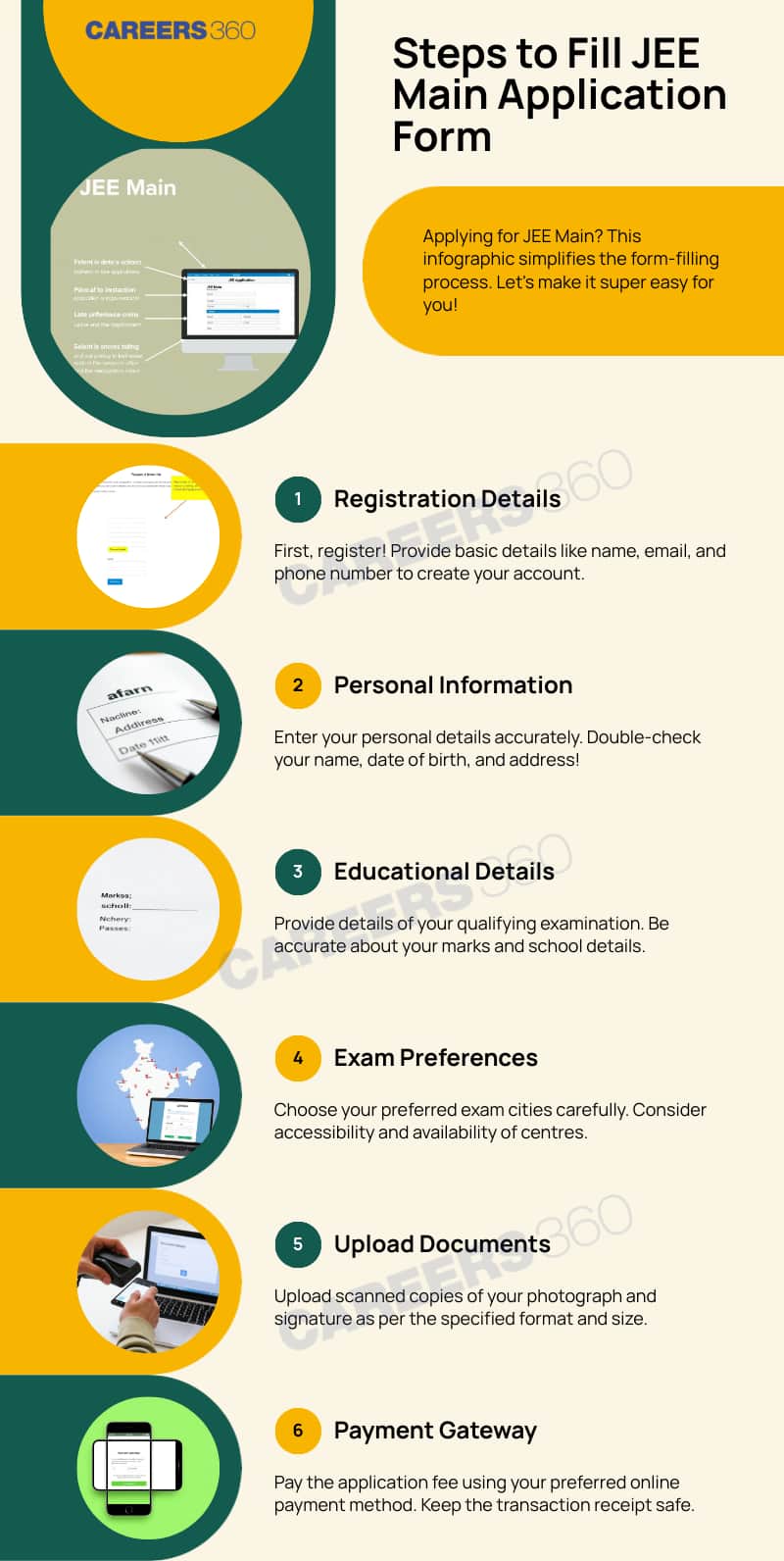
Candidates can check the step-by-step guide to fill out the JEE application form 2027. Also, they can check the JEE Main demo registration link to get a preview of the application portal. Students are advised to take the help of their parents or guardians before filling out the JEE Mains 2026 registration form to avoid any mistakes. However, they will be provided an opportunity to edit certain details later. Also, candidates must apply before the JEE Mains 2027 registration last date.
It is the first step in filling out the NTA JEE Mains application form. Read the steps below to to know how to do JEE Mains registration 2027:
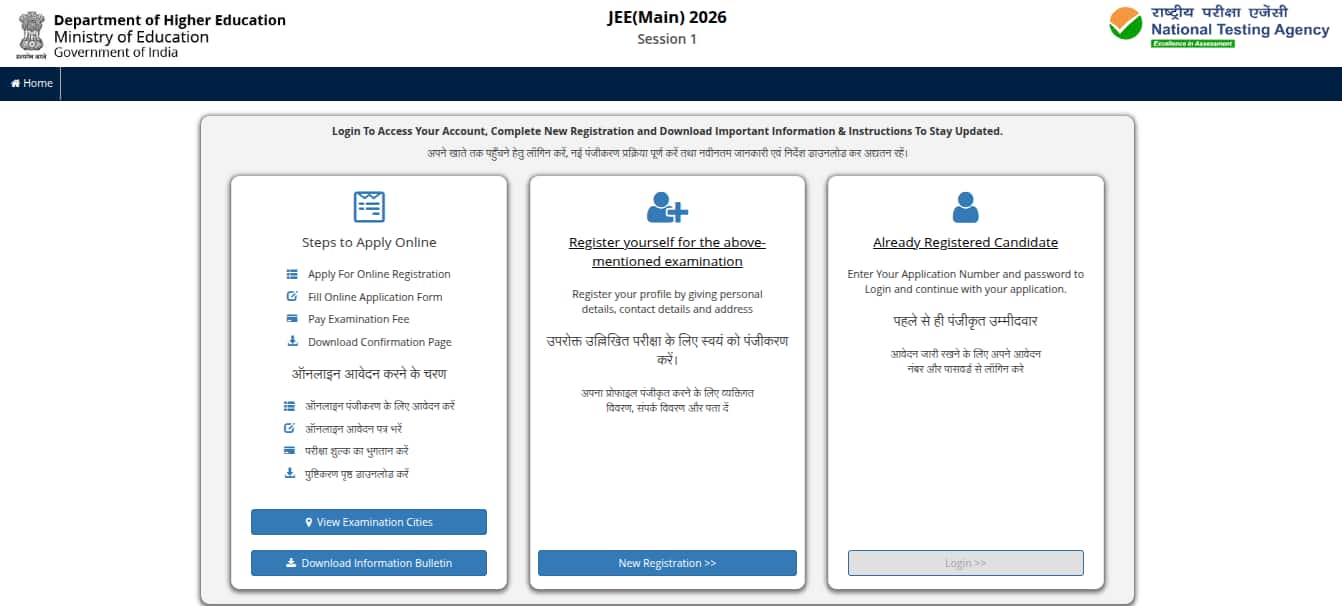
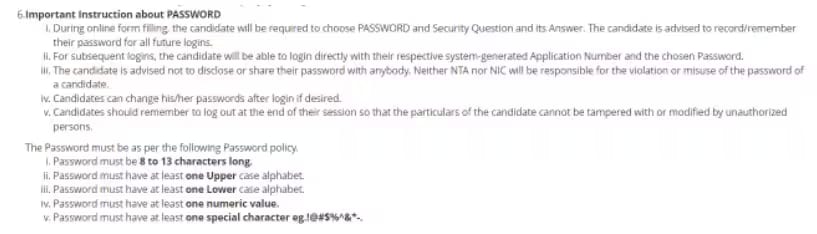
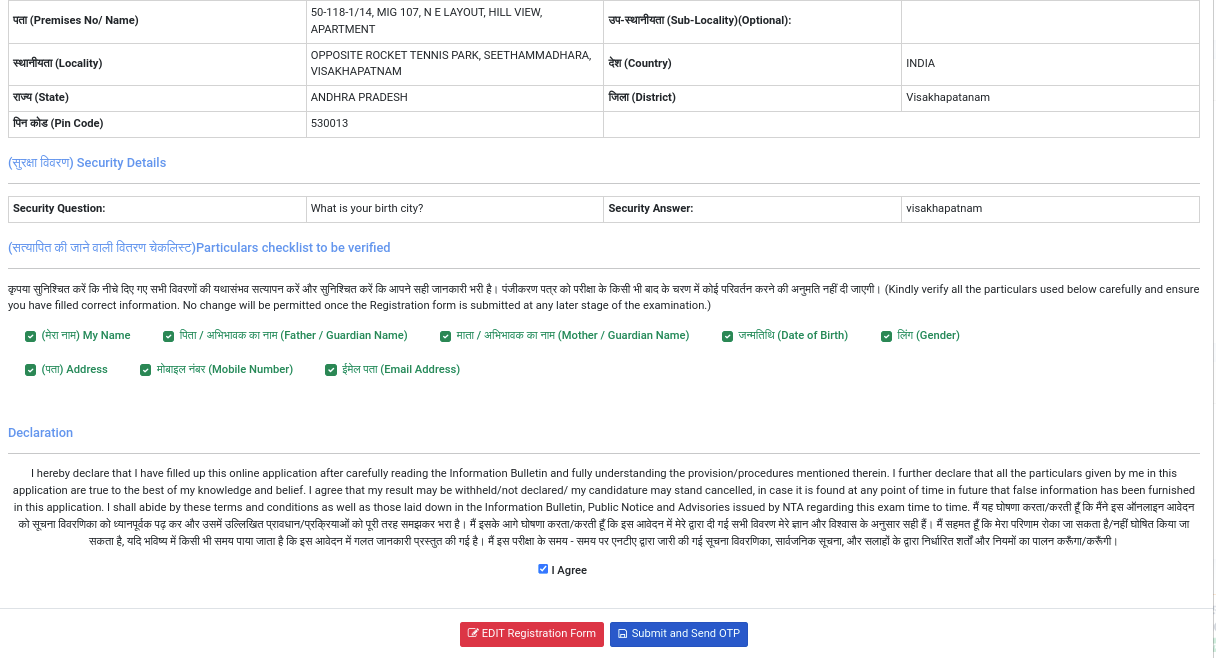
After the completion of JEE Main 2027 registration, students can continue filling out the detailed application form. For login, candidates have to use the registration number and password they have received at their email address/mobile number.
At this stage of the JEE Mains application form 2027, candidates have to provide information related to the country of residence, state of residence, category, the medium of education in classes 11 and 12, information on the diabetic condition, and language choice for the JEE Main question paper. Students also have to enter details about the paper for which they are appearing, Paper 1 or Paper 2 or both, and a choice of four JEE Main 2027 exam centres. At last, students will have to enter details about the marks in classes 10 and 12. Students who will be appearing in their class 12 exam in 2027 have to enter only class 10 details. After providing all the details, click on the submit button to proceed to the Live Photo Capture section.
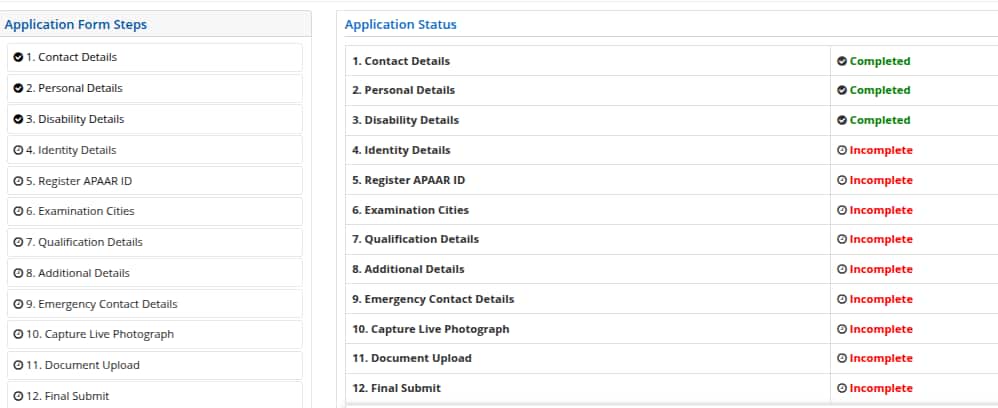
Candidates need to click a live photo after filling all the previous sections. This is a mandatory process in which aspirants can use an in-built camera or an external device like a mobile phone to click their real-time picture for JEE Mains registration 2027.
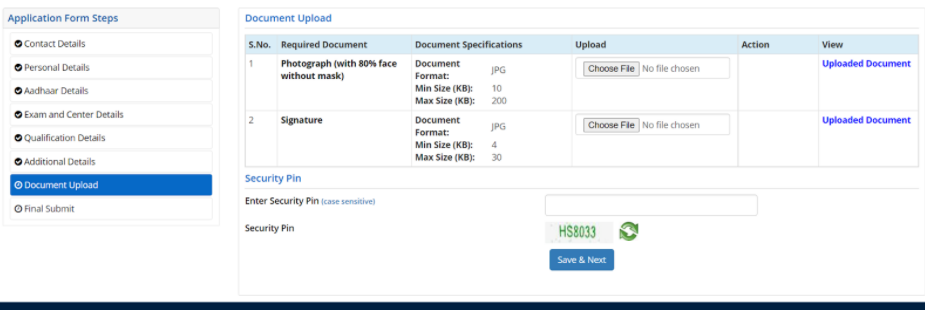
Candidates have to upload the scanned image of their passport-size coloured photograph and signature in the JEE Main 2027 application form. The size and file format of images should be strictly adhered to as per the NTA JEE Main photo and signature guidelines.
This is the last step in filling JEE Main application form 2027. After completing the registration, filling out the form, and uploading images, applicants will be redirected to the payment page. The payable fee will be displayed as per the gender and category of candidates. NTA JEE Mains 2027 registration fees has to be paid online through a credit/debit card or net banking. Students will be required to enter details of payment mode to complete the payment. Candidates will receive a message of successful payment of JEE Mains 2027 registration fees on their mobile numbers. After the payment of fees, the JEE exam form 2027 is completed.
If candidates encounter a name-mismatch message during Aadhaar authentication, they will be provided an option to correct the error. Such a provision was provided after the previous year JEE Main 2027 registration process as well.
Candidates filling the JEE Main 2027 application form must pay the prescribed registration fee to complete the process, as payment is mandatory for successful submission. The fee amount depends on the candidate's gender, category, and the number of papers (Paper 1, Paper 2, or both) they choose to appear for, along with whether the chosen exam centre is in India or abroad. Payment can be made online through credit card, debit card, or net banking. Candidates who register and pay for Session 1 need not pay again for Session 2, provided no changes are made to their application details.
Paper (s) Appearing | JEE Main 2027 Application Fees | ||
|---|---|---|---|
General | General-EWS/ OBC (NCL) | SC/ST/PwD/Transgender | |
For Exam Centres in India | |||
JEE Main Paper I (B.E./B.Tech) OR Paper II (B.Arch/B.Planning) | Boys - Rs. 1000 Girls - Rs. 800 | Boys - Rs. 900 Girls - Rs. 800 | Boys - Rs. 500 Girls - Rs. 500 |
Both JEE Main Paper I and Paper II | Boys - Rs. 2000 Girls - Rs. 1600 | Boys - Rs. 2000 Girls - Rs. 1600 | Boys - Rs. 1000 Girls - Rs. 1000 |
For Exam Centres in Foreign Country | |||
JEE Main Paper I (B.E./B.Tech) OR Paper II (B.Arch/B.Planning) | Boys - Rs. 5000 Girls - Rs. 4000 | Boys - Rs. 4500 Girls - Rs. 4000 | Boys - Rs. 2500 Girls - Rs. 2500 Transgender- Rs. 3000 |
Both JEE Main Paper I and Paper II | Boys - Rs. 10000 Girls - Rs. 8000 | Boys - Rs. 10000 Girls - Rs. 8000 | Boys - Rs. 5000 Girls - Rs. 5000 Transgender- Rs. 5000 |
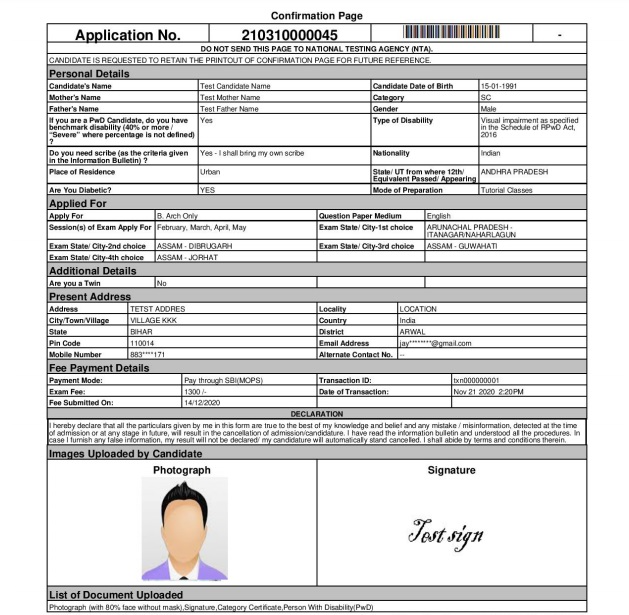
After submitting the registration form for JEE Main 2027, candidates can now download a copy of the application form for future use. Candidates will not be able to change their allotted JEE Main 2027 exam centre. Candidates whose application form for JEE Main 2027 is submitted correctly can download the admit card at the official website- jeemain.nta.nic.in 2027.
Students receive messages on their registered email address and mobile number on the successful submission of the JEE Mains 2027 application form. However, if students want to check the application status, they have to access the JEE Mains application login using the registration number and password. Students can check the status of their filled application form of JEE Main to confirm the final submission of the application form. Students will see the status of their registration upon login. JEE application form status, as well as the status of the application fee payment, will be displayed on the screen.
Candidates should keep all the JEE Mains 2027 registration documents handy to fill the form with ease. Below is the list of documents required for JEE Main registration 2027.
Candidates seeking reservation under PwD must have 40% disability. Along with the above said documents, candidates with physical disabilities should produce the PwD/PwBD certificate. However, the certificate should be issued in the prescribed format by the Government of India. Candidates can easily get the certificate from a Government hospital or authorised medical authority mentioning the type of disability, percentage of disability, and validity. The pdf document of PwD/PwBD certificate needs to be uploaded while filling the JEE Main application form online. Besides, candidates should bring the same at the exam centre for verification.
Candidates can check the dimensions and specifications of the JEE Main 2027 documents in the table below.
| Particular | Dimension | Size |
|---|---|---|
| Photograph in JPEG/JPG format | 3.5 cm x 4.5 cm | 10 KB to 200 KB |
| Signature in JPEG/JPG format | 3.5 cm x 1.5 cm | 10 KB to 100 KB |
| Class 10 certificate or equivalent in PDF format | 50 KB to 300 KB | |
| UDID Certificate in PDF Format (if applicable) | 50 KB to 300 KB | |
| Identity Proof in jpg/jpeg format | 10 KB to 200 KB |
Key changes in JEE Main registration, as announced for last year NTA JEE Mains process.
Aadhaar e-KYC: Automatically fetches personal details from UIDAI; applicants must match Aadhaar with school records. Some users reported form lock issues and city allotment linked to the Aadhaar address.
Live Photo Capture: A mandatory browser-based live photo during registration; applicants must use a device with a working camera. This was introduced as an anti-fraud measure.
Scanned ID Upload: Compulsory upload of Aadhaar, passport, or ID. Applicants should scan documents in advance. Issues with e-KYC have been reported by students.
Mandatory UDID for PwD: PwD candidates must upload their UDID and an updated medical certificate. Applicants should prepare documents early, as downtime on the UDID portal caused panic.
Class 11 Registration Number: Required to avoid clashes with board verification. Applicants should get the number from their school in advance; some schools were pressured to share IDs due to user complaints. Updated Fee Structure:
New fee slabs: Male: ₹1000 Female: ₹800 OBC/EWS Male: ₹900 SC/ST/PwD: ₹500 Applicants must ensure they provide the correct category proof, as certificate update reminders are trending.
More Test Cities Added: 33 new cities have been added. Applicants can choose 4 preferences but may be reassigned. This change has been widely praised for better accessibility.
New Form Sections: Additional fields for APAAR ID and disability details. Applicants must fill these carefully, as the correction window may not allow edits. Issues with UDID and overlaps have been widely discussed online.
There is a chance that students might lose or forget their passwords to login for NTA JEE Mains. The authority has the facility to help students retrieve their passwords. Students have to use the JEE Main 2027 login to retrieve their forgotten password.
In case students do not remember their JEE Main application form number, they can check their email address and mobile number. NTA sends the details of the application number to the candidate's mobile number and email address. Alternatively, they can also check the downloaded copy of their JEE Mains form 2027. In case no option is working, they can contact the NTA helpdesk over the phone or write to them through email to get the JEE Main 2027 application number.
Students might encounter problems during JEE Mains registration 2027. The problems can be in uploading images, payment, or in the information required for filling out the application form. Students can check below the quick fix to these common problems in JEE Mains form 2027.
Problem in Uploading Images: This is the most common problem faced by many students while filling out the JEE Mains application form 2027. This is because the images they use for uploading are not as per the specifications prescribed by NTA. The simple fix to this problem is to resize the image as per the specifications. There are many online tools available for resizing the image or you can visit any cyber cafe to get the image resized. Hence, keep the scanned images of documents in the specified format and size before starting to fill out the application form.
Problem in Payment of Application Fee: Although online payment is safe and easy, NTA JEE Mains applicants may face problems like the money has been deducted from their account but the application fee payment is still pending. In rare cases, some additional amount could also be deducted from the account. To all these problems, NTA has established a helpdesk where students can call and get solutions to their problems regarding the JEE Main 2027 application form.
Students aspiring to appear in the exam must ensure their eligibility criteria before filling out the NTA JEE Main application form 2027. Students who do not meet the minimum eligibility requirements were not able to apply for the exam. It is thus advised that every applicant must first check the eligibility criteria before filling up for session 1 JEE Mains 2027 registration form. Below are the eligibility norms
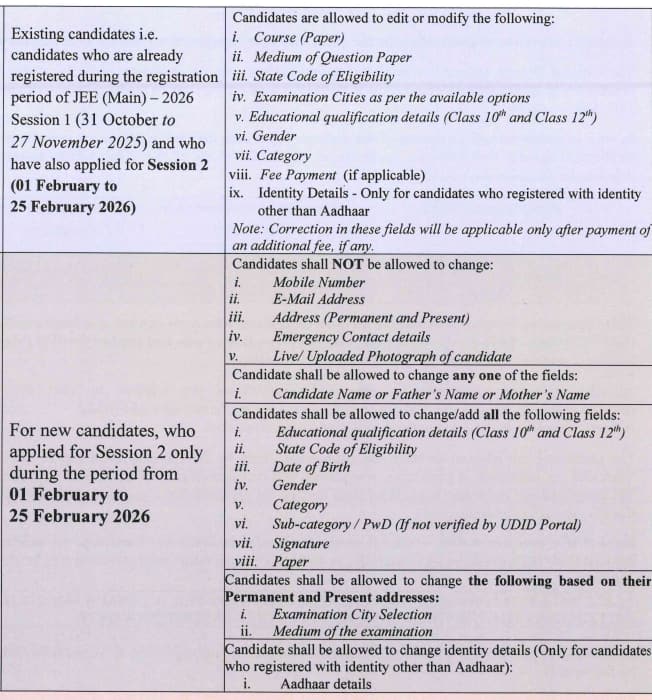
The National Testing Agency will start the JEE Main application form correction tentatively in November 2026. Students who entered any incorrect information in their application form or certificates will be able to update a few important details during this time. Candidates with defects in the uploaded photo will be able to make edits during the JEE Main 2027 photo correction process. Applicants require their log-in to access the JEE application form 2027 correction facility. Candidates have to pay an additional fee for modifying the details, while some details will be allowed for modification without any cost. Information that can be modified is as follows
How many students appeared for JEE Mains 2027?
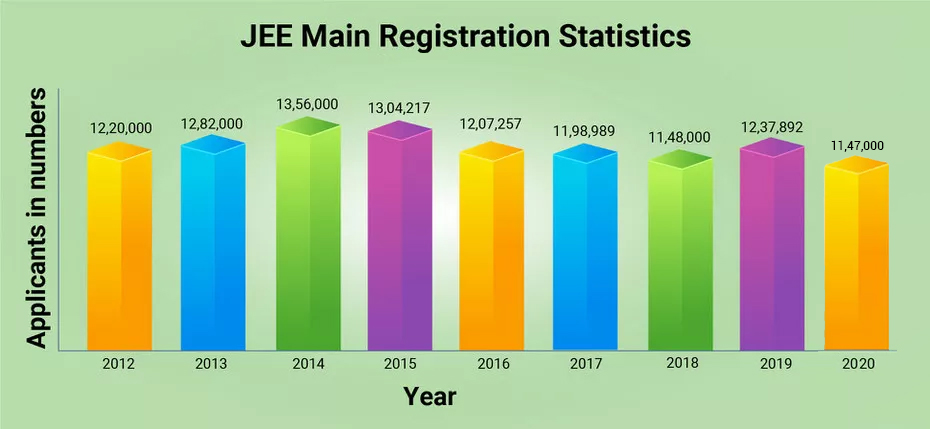
The total JEE Mains 2027 registration will be released by the authority on the official website, jee main nta nic 2026 along with the result. The NTA JEE Mains session 1 and 2 statistics for the previous years are mentioned below.
| Year | Registered | Appeared |
|---|---|---|
| JEE Main 2026 | 16,04,854 | 15,38,468 |
| JEE Main 2025 | 13,11,544 | 12,58,136 |
| JEE Main 2024 | 12,31,874 | 12,25,529 |
| JEE Main 2023 | 629000 | 594013 |
| JEE Main 2022 | 468205 | 404256 |
Also Read: Number of students who have appeared JEE Main session 1 | Rank Predictor JEE Main
Students who face problems while filling out the JEE Main application form can contact the National Testing Agency at the below-mentioned address
National Testing Agency
Block C-20 1A/8 ,Sector- 62
IITK Outreach Centre, Gautam Buddh Nagar
Noida-201309, Uttar Pradesh (India)
Contact No: 0120 -6895200
Frequently Asked Questions (FAQs)
Candidates require scanned images of their photo and signature while filling out the JEE Mains 2027 registration form.
The JEE Mains 2027 registration fee is different for Male and Female candidates. The JEE Mains registration fee for General male candidates will be Rs. 1000 while female students have to pay Rs. 800 to appear in a single session.
If you're unable to pay the JEE Main 2027 application fee, try again after some time or log out and log back in to retry. If the issue persists, contact the NTA JEE Mains helpline for assistance.
The JEE Mains 2027 registration date session 1 will be announced.
Yes, candidates can upload a black and white photo, but it must clearly show 80% of the face (without a mask) against a white background.
No, the JEE Mains 2027 registration link session 1 will be activated in October 2026, tentatively.
Candidates need not fill out separate forms for both sessions of JEE Main 2027.
All students who are appearing for improvement should fill the year of the first attempt as well as the roll number as the year of passing as the pass percentage will be considered later for admissions.
No. NTA allowes candidates to register for JEE Main 2027 using DigiLocker, Aadhaar Card number, Passport Number or PAN card number.
NTA will set up a Query Redressal System (QRS) to help students with their queries and grievances. This is 24x7 helpline and students registering their issues will be given a number to track the status.

On Question asked by student community
Dear Student,
You can access JEE Main Mathematics previous-year questions on Careers360. Practising previous-year questions will help you understand the exam pattern and question types.
Hello Student,
You can check the resources provided below:
Hope this helps!
Hello, since you are in Intermediate 2nd year with the MPC group and preparing for JEE Main, focus on completing the syllabus, revising important concepts and solving previous years’ JEE Main question papers. Take regular mock tests and analyse your mistakes to improve your score. Keep a realistic study schedule
Dear Student
Please specify whether you want Physics, Chemistry, or Mathematics, and which JEE Main/Advanced exam.
Hi Ansh Chauhan
Check the link below for the high-weightage Physics chapters for JEE Main 2027 based on recent exam trends. Students can use these chapters to prioritise their preparation and focus more on topics that have appeared frequently in previous papers.
https://engineering.careers360.com/articles/most-weightage-chapters-for-jee-main-physics-2027

Merit Scholarships | NAAC A+ Accredited | Top Recruiters : E&Y, CYENT, Nvidia, CISCO, Genpact, Amazon & many more
Ranked #43 among Engineering colleges in India by NIRF | Get Upto 100% Scholarships
100% Placement Support | State-of-the-art Infrastructure
Application Free of Cost for Limited Time || NAAC A++ Accredited | Highest CTC 52 LPA | #11 in University Category by NIRF
Scholars’ Round Deadline: 14th Nov’26 | Earn upto 50% merit Scholarship + 10% for top performers | EFMD Accredited | AACSB (USA) & AMDISA Member | Highest CTC 28 LPA
B.Tech Application Open 2027 | Highest CTC 44.14 LPA | UGC Approved | 1600+ Recruiters | 100% Placement