Amity University B.Tech Admissions 2026
Among top 100 Universities Globally in the Times Higher Education (THE) Interdisciplinary Science Rankings 2026


JEE Main 2026: NTA has uploaded the JEE Main 2026 session 2 JEE Main 2026 paper 2 result on May 5 at the official website, jeemain.nta.nic.in. Enter the application number and password to check the JEE Main session 2 result. Further, the JEE Main 2026 result for session 2 paper 1 was declared on April 20. Candidates were able to use the JEE Main 2026 paper 2 answer key to raise objections until April 27, 2026.
Latest: JEE Mains 2026 paper 2 result
The authority has released a notice to promote transparency in the JEE Main process. It shows the category-wise distribution across all shifts of the JEE Main sessions 1 and 2. Also, the data and number of candidates within a certain percentile range have been released. It shows that 3 aspirants were able to secure 100 percentile in only 1 shift of JEE Main session 1. However, more than 1 candidate was able to achieve 100 percentile in 4 different shifts of JEE Main session 2. The JEE Main 2026 toppers List for session 2 has been released along with the result.
To download the result, candidates will need their application number and password. The final result will determine admissions to NITs, IIITs, and GFTIs as well as eligibility for the JEE Advanced 2026 exam. Candidates must rank among the top 2,50,000 successful candidates (across all categories) in B.E./B.Tech. paper of JEE Main 2026.
| Sections | Details |
|---|---|
No. of sessions/attempts | 2 |
Languages | English, Hindi, Urdu, and 11 other regional languages |
JEE Main exam pattern for B.Tech |
|
JEE Mains paper pattern for B. Arch / B Planning |
|
Tie Resolving Methodology for B.Tech | For candidates obtaining equal NTA scores, the JEE Main 2026 tie-breaker policy is given below
Candidates having a lesser number of negative responses in the paper |
NTA JEE Main 2026 Forms |
|
Application fee refund | In case a candidate does not want to appear in the session for which the fee has already been paid, it will be refunded |
| JEE Main exam total marks | 300 - Paper 1 400 - Paper 2 |
JEE Main Exam timing |
|
NTA JEE Main 2026 official website | jeemain.nta.nic.in |
JEE Main exam centres | 323 cities (including 15 cities abroad) |
The full form of the JEE Main is the Joint Entrance Exam Main (JEE Main). The exam is a national-level entrance test conducted as a computer-based test for admission to B.E/B.Tech/B.Planning/B.Arch courses. The authorities conduct the JEE Main exam for 2 papers. Paper 1 is conducted for B.E./B. Tech course admission at NITs, IIITs, and GFTIs, while paper 2 is conducted for admission to B.Arch and B.Planning courses at various institutes accepting JEE Main exam scores for admission. The top 2,50,000 rank holders listed in the rank list of the JEE Main 2026 exam will be eligible to appear for the JEE Advanced exam.
| Related Article Link : | |
|---|---|
Address: Block C-20 1A/8, Sector- 62, IITK Outreach Centre, Gautam Buddh Nagar, Noida-201309, Uttar Pradesh (India)
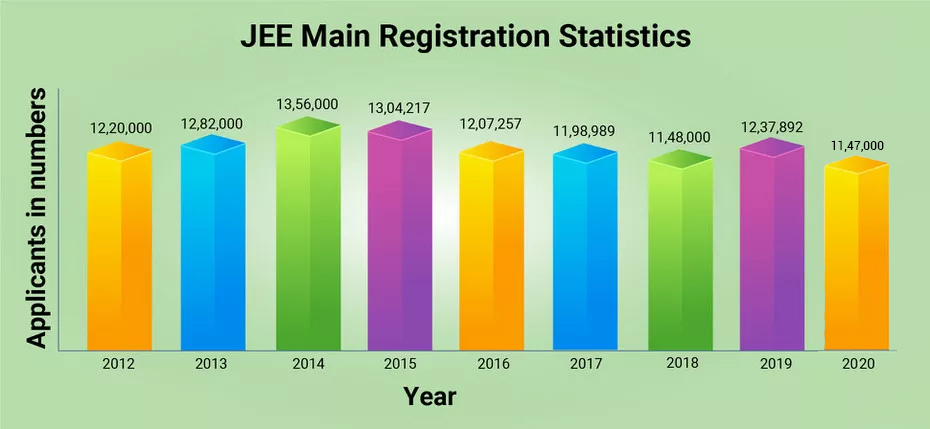
National Testing Agency has released the JEE Main 2026 statistics on the official website. Candidates can check the JEE Main statistics to know how many students appeared for the JEE Main exam.
| Year | Students Registered | Students Appeared |
|---|---|---|
| 2026 | January - 13,55,293 April - 8, 61, 343 | January - 13,04,653 April - 8,00,516 |
| 2025 | January - 13,11,544 April - 10,61,840 | January -12,58,136 April -9,92,350 |
| 2024 | January - 12,21,624 April - 11,79,569 | January - 11,70,048 April - 10,67,959 |
2023 | January - 860064 April - 931334 | January - 823967 April - 883367 |
2022 | June - 872970 July - 622034 | June - 769604 July - 540242 |
2021 | February - 652628 March - 619641 July - 709611 August - 767700 | February - 621033 March - 556248 July - 543553 August - 481419 |
2020 | 11.74 Lakhs | 10,23 Lakhs |
2019 | January - 9,29,198 April - 9,35,755 | January - 8,74,469 April - 8,81,096 |
2018 | 11,48,000 | 10,43,739 |
2017 | 1186454 | Online - 165635 Offline - 956716 |
2016 | 12,07,257 | Online - 10,22,808 Offline - 1,72,058 |
2015 | 13,04,646 | Online - 11,05,135 Offline - 1,87,782 |
2014 | 13,56,805 | Online - 11,72,538 Offline - 1,72,369 |
2013 | 12,60,219 | 11,89,777 |
2012 | 11,45,353 | 10,70,276 |
2011 | 11,14,880 | 10,53,833 |
2010 | 11,18,147 | 10,65,100 |
2009 | 10,10,061 | 9,62,119 |
| Full Exam Name | Joint Entrance Examination (Main) |
| Short Exam Name | JEE Main |
| Conducting Body | National Testing Agency |
| Frequency Of Conduct | Twice a year |
| Exam Level | National Level Exam |
| Languages | Assamese +12 more |
| Mode Of Application | online |
| Application Fee | Online : 1000 |
| Mode Of Exam | online |
| Mode Of Counselling | online |
| Participating Colleges | 2044 |
| Exam Duration | 3 Hours |
JEE Main Joint Entrance Examination (Main) (session 2026)
NTA has released the JEE Main 2026 final session 2 paper 2 answer key online. The provisional answer key was released on April 25, 2026. Interested candidates were able to submit a challenge against the JEE provisional answer keys online by paying a non-refundable fee of Rs 200 for every question. NTA released the JEE Main 2026 official provisional answer key, which contained the correct responses to questions asked in JEE Mains 2026. Candidates can use the JEE Mains exam answer key to verify their answers and predict probable scores.
The National Testing Agency (NTA) has released the final answer key for JEE Main 2026 session 1 on February 16, 2026. The JEE Main 2026 answer key has been uploaded on the official website, jeemain.nta.nic.in. The final JEE Main exam answer key is released in PDF format. Moreover, the authority also has released the JEE Main 2026 response sheet and question paper along with the provisional answer key. Candidates can follow the steps mentioned below to download the JEE Main answer key 2026.
NTA published the answer option with the question ID and not the actual question asked. So what is the JEE Main 2026 question ID? This is the number given to each question asked in the NTA JEE Mains question paper and also given in the candidate's response sheet.
So the first step candidates must do is to download the JEE Main exam question paper. This means that they will have all the question Ids on hand. Then they must check the JEE Main provisional answer key 2026 for the questions and match them. In case of discrepancy, they must note the NTA JEE Main question ID and the answer ID to keep track of the same.
The authorities allowed the candidates to challenge the provisional JEE Main 2026 Session 2 paper 2 answer key from April 25 to 27, 2026. Candidates have to pay a processing fee of Rs. 200 per question to challenge the provisional JEE Mains 2026 answer key. This processing fee will be refunded if the candidate's challenge is accepted by the authorities. The final JEE Main answer key 2026 will be released after considering the objections raised by the candidates.
Along with the NTA JEE Main exam answer key, the authorities released the response sheet. The response sheet consists of the details of the answers marked by a candidate. The NTA JEE Main 2026 candidate response sheets also allow candidates to go through their responses and raise any objections to the official answer key.
Related links:
JEE Main Answer Key by Aakash Institute
JEE Main Answer Key by FIITJEE
JEE Main Answer Key by Sri Chaitanya
The National Testing Agency will issue the final JEE Main answer key 2026 for paper 2 on the official website, jeemain.nta.nic.in. The provisional answer key of JEE Main paper 2 will be released in February for session 1. The authority also allowe candidates to challenge the JEE Mains provisional answer key.
The National Testing Agency has released the JEE Main 2026 exam eligibility along with the official notification. Candidates who qualify for the class 10+2 exam from a recognised board can apply for the JEE Mains 2026 exam. Moreover, it is informed that JEE Main eligibility marks in 12th are not required for appearing in JEE Mains exam 2026. The 75% mark is required while taking admission to the participating institutes. For SC / ST candidates, the qualifying marks should be 65%.
NTA JEE Main 2026 eligibility criteria consist of age limit, compulsory academic details, mandatory subject in class 12, minimum percentage, and more. Candidates appearing in class 12 with results awaiting are also eligible to apply. Besides, candidates must be among the top 2,50,000 in NTA JEE Main Paper-1 to be eligible for JEE Advanced 2026.
Also check: Eligibility for JEE Advanced
| Particulars | Details |
|---|---|
Age limit to appear for JEE Main 2026 | No age limit prescribed |
Qualifying Examination | Candidates must have cleared class 12 or equivalent exams in 2024, 2025 or appearing in 2026 are also eligible. |
Required subject in class 12 | A minimum of 5 subjects, with Mathematics, Physics and Chemistry as mandatory subjects. Along with a language, one vocational subject shall have been studied. |
Minimum percentage required in class 12 | Candidates should have secured at least 75% in the class 12 for admission. For BArch admissions, at least 50% marks should have been secured. |
Maximum attempts | A candidate can attempt JEE Main two times a year for three years consecutively. Hence, a candidate can appear for the JEE Main exam in 6 attempts. |
| Course | Required Criteria |
|---|---|
B.E/B.Tech. | Passed 10+2 exam with Physics and Mathematics as compulsory subjects along with one of the Chemistry/Biotechnology/Biology/Technical Vocational subjects. Candidates must have a required percentage of 75% marks in board exams. For SC/ST, the required percentage is 65%. |
Passed 10+2 exam with Mathematics, Physics, Chemistry or 10+3 Diploma with Maths. Candidates must have a required percentage of 50% marks. | |
Passed 10+2 exam with Mathematics |
| Category | Reservation |
|---|---|
Other Backward Classes (OBC) if they belong to Non-Creamy Layer (NCL) | 27% |
Scheduled Castes (SC) | 15% |
Scheduled Tribes (ST) | 7.5% |
Persons with Disability (PwD) with 40% or more disability | 5% horizontal |
Female Category (supernumerary) only in NITs | 20% (all UG programmes taken together in IITs and individual programms in NITs, IIEST Shibpur and some IIITs) |
EWS (Supernumerary) | 10% |
Note: Reservation for the NITs, IIITs, and GFTIs will be as per the central list and not as per the state of eligibility.

NTA has closed the reopened JEE Main 2026 application form for session 2 on March 13, 2026. Eligible candidates had to fill the JEE Main exam registration form at jeemain.nta.nic.in. The authority has revised the JEE Main registration steps. As per the latest registration process, applicants have to fill out three new sections added for APAAR ID, disability details, and live photo capture for JEE Main registration 2026. The form correction for JEE Main 2026 conducted from February 27 & 28, 2026. The JEE Main 2026 application form for session 2 was concluded on February 25, 2026. Find below the steps for JEE Main registration.
Below are the steps to fill out the JEE Main 2026 application form.
It is the first step in filling out the JEE Mains application form. Read the steps below to fill out the JEE Main 2026 application form:
Click on the jeemain.nta.nic.in 2026, the registration link
Click on the JEE Main 2026 session 1 registration link
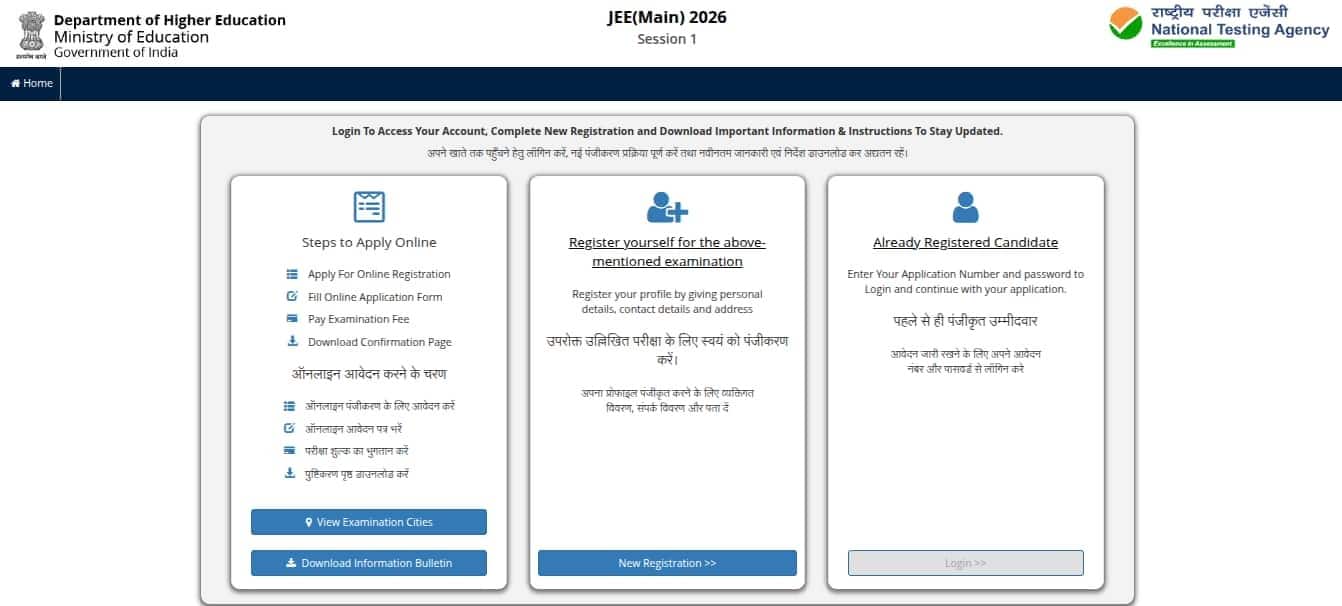
The JEE login page will appear
There are three simple steps to apply online: registration, filling out the online application form, and submitting the document.
Click on the ‘New Registration’ button, provided in the middle section.
Instructions and Procedure for online submission of the application form page will be displayed.
Go through the complete instructions carefully and then select the declaration
Click on the “click here to proceed” button
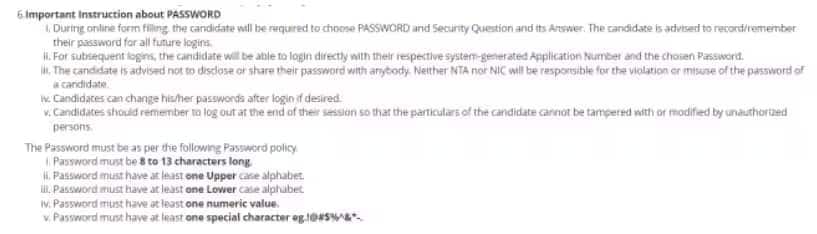
The JEE Main 2026 registration form will appear.
Provide personal details, present and permanent address
Choose a password, and enter the security pin
Finally, click on the submit button
A preview of the JEE 2026 registration form will appear
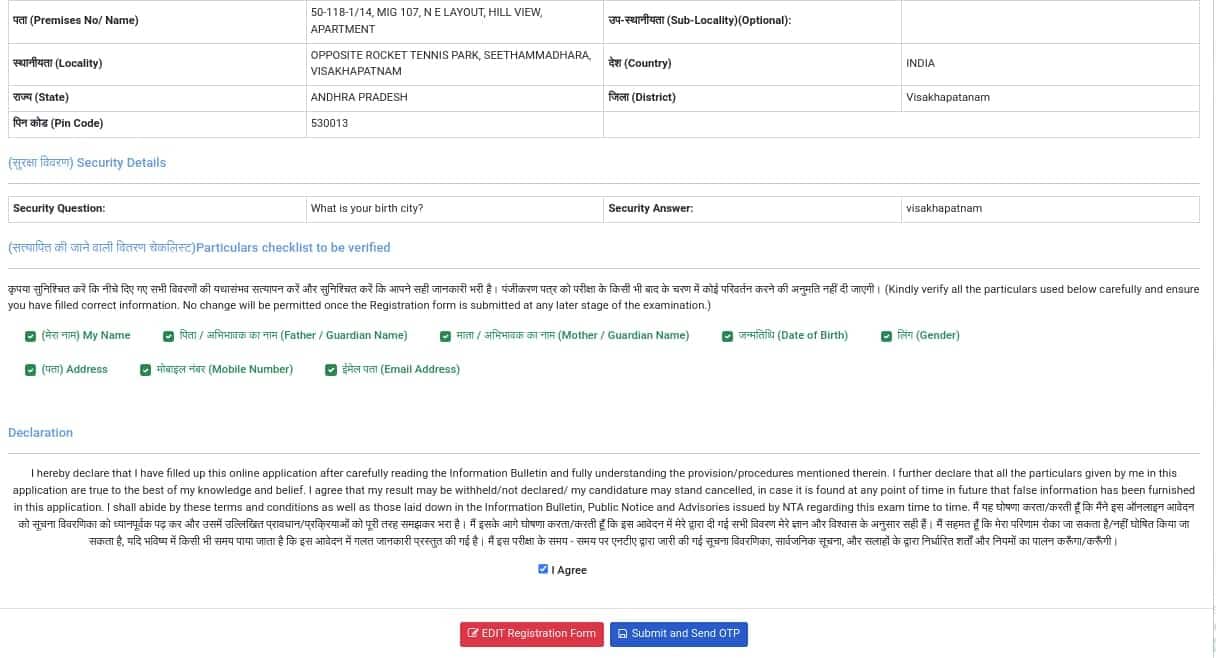
Candidates have to verify the checklist and confirm the declaration
Hereafter, click on the submit and send OTP button
Verify the registered mobile number and email ID
After the completion of JEE Main 2026 registration, students can continue filling out the detailed application form. For login, candidates have to use the registration number and password they have received at their email address/mobile number.
At this stage of the JEE Main application form, candidates have to provide information related to the country of residence, state of residence, category, the medium of education in classes 11 and 12, information on the diabetic condition, and language choice for the JEE Main question paper. Students also have to enter details about the paper for which they are appearing, Paper 1 or Paper 2 or both, and a choice of four JEE Main 2026 exam centres. At last, students will have to enter details about the marks in classes 10 and 12. After providing all the details, click on the submit button to proceed to the Live Photo Capture Section.
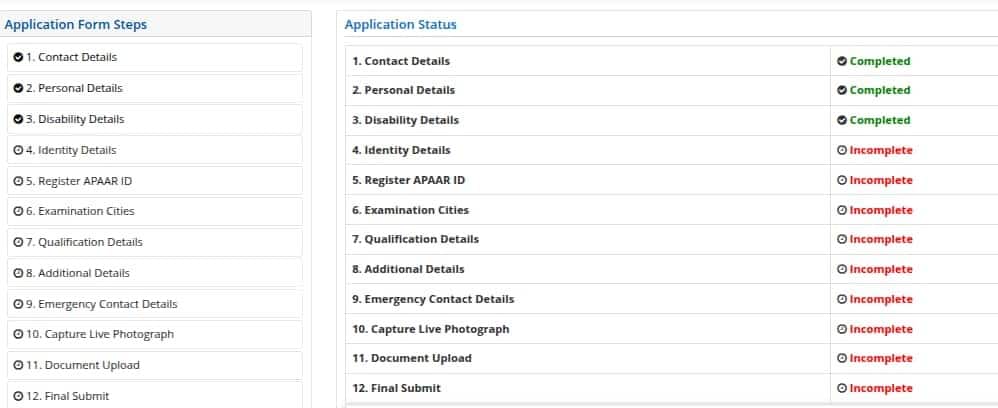
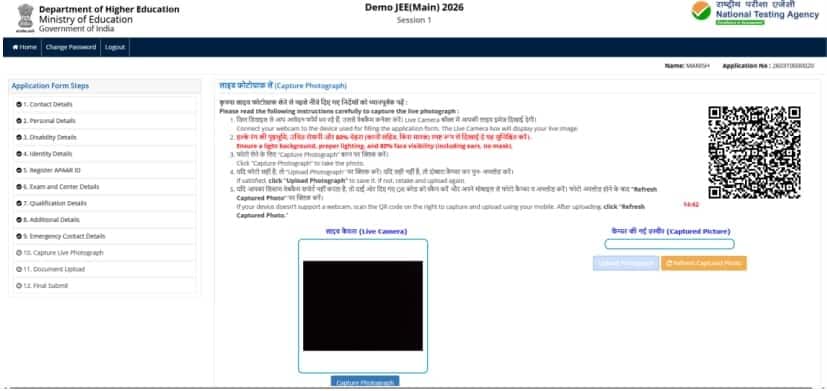
Candiates need to click a live photo after filling all the previous sections. This is a mandatory section, in which aspirants can use an in-built camera or an external device like a mobile phone to click their real-time picture.
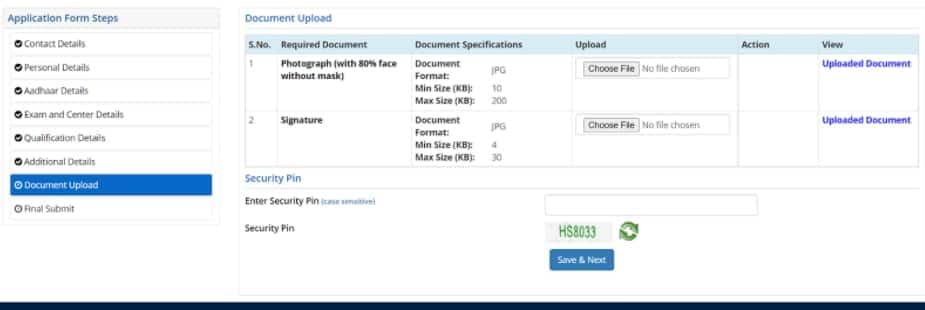
Candidates have to upload the scanned image of their passport-size coloured photograph and signature in the JEE Main 2026 application form. The size and file format of images should be strictly adhered to as per the NTA JEE Main photo and signature guidelines.
After completing the registration form, filling out the form, and uploading images, applicants will be redirected to the payment page. The payable fee will be displayed as per the gender and category of candidates. NTA JEE Mains 2026 registration fee has to be paid online through credit/debit card or net banking. Students will be required to enter details of the payment mode to complete the payment. A message of successful payment of JEE Main application form 2026 fees will be sent to their mobile numbers.
Category | BE./BTech or BArch or B.Planning | BE./BTech & BArch or BE./BTech & BPlanning or BE./BTech, BArch & BPlanning or BArch & BPlanning |
General | For Males- Rs 1000 For Females- Rs 800 | For Males- Rs 2000 For Females-Rs 1600 |
EWS/OBC-NCL | For Males- Rs 900 For Females- Rs 800 | For Males- Rs 2000 |
SC/ST/PWD/Transgender | For All- Rs 500 | For All- Rs 1000 |
Category | B.E./B.Tech or B.Arch or B.Planning | B.E./BTech & BArch or BE./BTech & BPlanning or BE./B.Tech, BArch & B. Planning or BArch & BPlanning |
General | For Males- Rs 5000 For Females- Rs 4000 | For Males- Rs 10000 For Females- Rs 8000 |
EWS/OBC-NCL | For Males - Rs. 4500 For Females- Rs. 4000 | For All- Rs 5000 |
SC/ST/PWD/Transgender | M / F- Rs 2500 Trasgender - Rs. 3000 | For All- Rs 5000 |
If candidates encounter a name-mismatch message during Aadhaar authentication, they will be provided an option to correct the error. Such a provision was provided in the previous year as well.
The National Testing Agency conducted session 2 JEE Main 2026 application form correction from February 27 to 28, 2026, on the official website. The JEE Main form correction was available online. Students who entered any incorrect information in their application form or candidates with defects in uploaded images can make edits till the last date. Applicants require their log-in to access the JEE application form 2026 correction facility. Candidates need to pay an additional fee for modifying the details, while some details will be allowed for modification without any cost. Information that can be modified is as follows
Personal Details: Spelling mistakes in name, parent's name, etc can be corrected.
Academic Details: School details, year of passing, and qualifying exam can be corrected in this section.
Change of Paper: The choice of paper from Paper 1 to Paper 2 as well as from Paper 2 to Paper 1. If candidates have applied for one paper and wish to apply for both papers they can do so on payment of the balance fee.
Exam Centres: Candidates will not be able to change their choice of exam centres.
Language of Examination: The language can be changed from English to Hindi/Gujarati and vice versa.
Name, State of Eligibility, and Date of Birth can also be corrected by candidates
Category: Candidates can also change their category. If the candidates change their category from general to reserved, then fees will not be refunded. If candidates change their category from reserved to general, they will have to pay the balance fee.
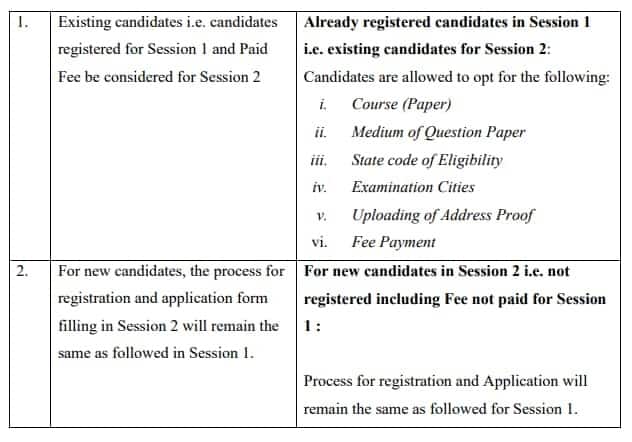
After submitting the registration form for JEE Main 2026, candidates have to download a copy of the application form for future use. Candidates will not be able to change their allotted JEE Main 2026 exam centre. Candidates whose application form for JEE Main 2026 is submitted correctly can download the admit card at the official website- jeemain.nta.nic.in.
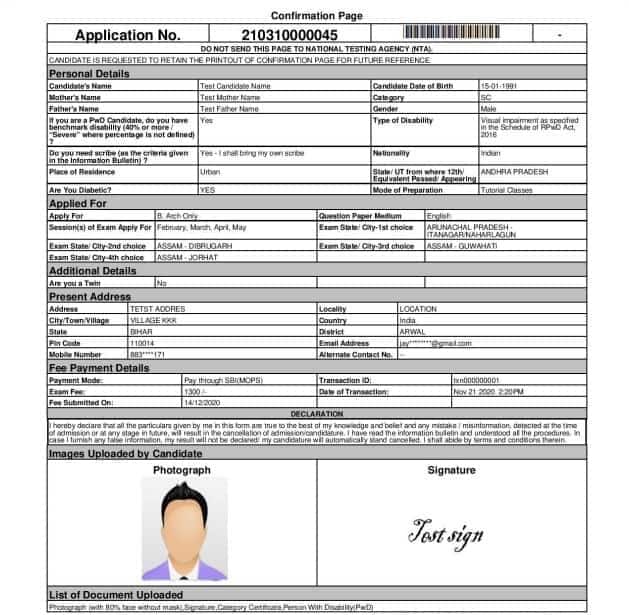
To retrieve the NTA JEE Main 2026 application number, candidates must click on the option for the same on the login window. They must enter the following details
Check your college admission chances based on your JEE Main percentile with the JEE Main 2026 College Predictor.
Try Now| State | City |
| Andaman and Nicobar Islands | Port Blair |
| Andhra Pradesh | Chittoor Eluru Guntur Kurnool Kakinada Nellore Rajahmundry Tirupati Vijayawada Visakhapatnam Vizianagaram Ongole Srikakulam Proddatur Kadapa Anantapur Bhimavaram Narasaraopet Surampalem Machilipatnam Tadepalligudem |
| Assam | Dibrugarh Guwahati Jorhat Silchar Tezpur |
| Bihar | Bhagalpur Gaya Muzaffarpur Patna Purnea Darbhanga Arrah Aurangabad Samastipur Rohtas Bihar Sharif |
| Chhattisgarh | Bilaspur Raipur Bhilai Nagar Ambikapur Jagdalpur Durg |
| Delhi | Delhi New Delhi |
| Goa | Panaji Mapusa |
| Gujarat | Ahmedabad Anand Jamnagar Rajkot Surat Vadodara Valsad Himatnagar Gandhinagar Mehsana Vapi Junagadh Bhuj |
| Haryana | Ambala Faridabad Hisar Gurugram |
| Himachal Pradesh | Shimla Hamirpur Mandi Una Kullu Bilaspur Kangra |
| Jammu and Kashmir | Jammu Srinagar Samba Pulwama |
| Jharkhand | Dhanbad Jamshedpur Ranchi Hazaribagh Bokaro Ramgarh |
| Karnataka | Ballari Hassan Udupi Bangalore Gulbarga Hubballi Mangaluru Mysore Shivamogga Davanagere Belagavi Chikkamagaluru Tumakuru Dharwad |
| Kerala | Alappuzha Ernakulam Kannur Kollam Kottayam Kozhikode Malappuram Palakkad Thiruvananthapuram Thrissur Idukki Kasaragod Pathanamthitta Chengannur Muvattupuzha Wayanad Payyanur |
| Madhya Pradesh | Bhopal Gwalior Indore Jabalpur Sagar Satna Ujjain Balaghat Khandwa |
| Maharashtra | Ahmednagar Akola Aurangabad Jalgaon Kolhapur Mumbai Nagpur Nanded Nashik Pune Solapur Thane Chandrapur Dhule Latur Ratnagiri Sangli Satara Wardha Beed Bhandara Buldhana Yavatmal Parbhani Gadchiroli Jalna Navi Mumbai |
| Manipur | Imphal |
| Meghalaya | Shillong Tura |
| Mizoram | Aizawl |
| Nagaland | Dimapur Kohima |
| Odisha | Balasore Berhampur Bhubaneswar Cuttack Rourkela Sambalpur Dhenkanal Angul Bhadrak Mayurbhanj Baripada Jajpur Kendrapara Kendujhar Puri Jagatsinghpur Jeypore Balangir Rayagada Bargarh Ganjam |
| Puducherry | Puducherry |
| Punjab | Amritsar Jalandhar Ludhiana Patiala Pathankot Bathinda Fatehgarh Sahib Phagwara |
| Rajasthan | Ajmer Alwar Bikaner Jaipur Jodhpur Kota Sikar Udaipur Sri Ganganagar Dausa Hanumangarh Bharatpur Bhilwara |
| Sikkim | Gangtok |
| Tamil Nadu | Chennai Coimbatore Kanyakumari Madurai Namakkal Salem Tiruchirappalli Tirunelveli Cuddalore Thanjavur Thoothukudi Vellore Virudhunagar Nagercoil Kanchipuram Viluppuram Krishnagiri Tiruppur Dharmapuri Dindigul Erode Karur Nagapattinam Pudukottai Ramanathapuram Sivaganga Tiruvannamalai |
| Telangana | Hyderabad Karimnagar Khammam Mahabubnagar Nalgonda Nizamabad Suryapet Siddipet Kothagudem Jagtial Warangal |
| Tripura | Agartala |
| Uttar Pradesh | Agra Aligarh Allahabad Bareilly Ghaziabad Gorakhpur Greater Noida Noida Jhansi Kanpur Lucknow Meerut Mathura Moradabad Muzaffarnagar Varanasi Ayodhya Sitapur Ambedkar Nagar Azamgarh Ballia Bulandshahr Chandauli Firozabad Ghazipur Mau Raebareli Saharanpur Pratapgarh |
| Uttarakhand | Dehradun Roorkee Almora Pauri Garhwal Haldwani |
| West Bengal | Asansol Durgapur Hooghly Howrah Kalyani Kolkata Siliguri Burdwan Bankura Suri Paschim Medinipur Purba Medinipur Murshidabad Baharampur |
| Lakshadweep | Kavaratti |
| Ladakh | Leh Kargil |
| Dadra and Nagar Haveli | Silvassa |
| Chandigarh | Chandigarh Sahibzada Ajit Singh Nagar |
| Arunachal Pradesh | Naharlagun |
| Daman and Diu | Diu |
Among top 100 Universities Globally in the Times Higher Education (THE) Interdisciplinary Science Rankings 2026
Last Date to Apply: 30th May | Ranked #43 among Engineering colleges in India by NIRF | Highest Package 1.3 CR , 100% Placements
NTA will release the JEE Main 2026 exam pattern on the official website. The authority has removed the option of selecting 5 out of 10 questions in paper 1, in 2025. The JEE Main paper pattern 2026 states that there will be 5 compulsory numerical questions in section B of paper 1. Aspirants appearing for JEE Main Paper 1 must be conversant with the exam pattern. Students can know what to expect in the exam in terms of types of questions, marking scheme, language, mode, and more. Candidates can check the exam pattern of JEE Main 2026 Paper 1 below.
Particulars | Details |
Exam Mode | Computer-based examination |
Test Duration | Three hours |
Language of Examination | English, Hindi, Assamese, Bengali, Gujarati, Kannada, Marathi, Malayalam, Odia, Punjabi, Tamil, Telugu, and Urdu. |
Type of Questions |
|
No. of Sections | Three are three sections:
|
JEE Mains Total questions | Mathematics: 25 (20+5) 5 Questions with answers as a numerical value. All 5 questions are compulsory. Physics: 25 (20+5) 5 Questions with answers as a numerical value. All 5 questions are compulsory. Chemistry: 25 (20+5) 5 Questions with answers as a numerical value. All 5 questions are compulsory. Total: 75 Questions (25 questions each) |
JEE Mains total marks | 300 Marks (100 marks for each section) |
JEE Main Marking Scheme | MCQs: Four marks will be awarded for each correct answer and there will be a negative marking of one mark on each wrong answer. Questions with numerical value answers: Candidates will be given four marks for each correct answer and there will be a negative marking of 1 mark for each wrong answer. |
NTA has announced significant JEE Main exam pattern changes for the year 2025. The authority has discontinued optional questions in Section B, which were previously introduced during the COVID-19 pandemic. Candidates will now be required to answer all 5 questions in this section, eliminating the choice of selecting questions. B.Arch or B.Plan aspirants appearing for JEE Main Paper 2 must be conversant with the exam pattern.
With the help of JEE Main exam pattern 2025 for paper 2 , candidates can know details on types of questions, marking scheme, language, mode, and more. Paper 2 of JEE Main is separate for B.Arch and B.Plan applicants. While both have aptitude and mathematics in common, B.Arch students must take up the drawing test while the B.Plan applicants must answer JEE Main 2025 questions on planning. Candidates can check the exam pattern of JEE Main 2025 below.
| Exam mode | Computer-based | ||
| Exam duration | 3 hours | ||
| Languages/ Medium | Candidates can answer JEE main 2024 questions in 13 languages. The details and guidelines for languages are the same as for Paper 1. | ||
| Duration | 3 hours | ||
| JEE main 2024 Number of shifts | Two shifts per day: (9:00 am to 12:00 pm and 3:00 pm to 6:00 pm) | ||
| Type of Questions in JEE Main 2024 | For Maths and Aptitude -Multiple choice questions (MCQs) and Numerical Questions (NQs) | ||
| Drawing - questions requiring drawing | |||
| JEE Main Question Paper details | Subject | No of Questions | Marks |
| Part 1 - Mathematics | 20 MCQs + 5 Numerical (all 5 are compulsory) | 100 | |
| Part 2 - Aptitude | 50 MCQs | 200 | |
| Part 3 - Drawing | 2 | 100 | |
| Total | 77 | 400 | |
| Marking Scheme for MCQs Mathematics-Part I Aptitude Test-Part II | Correct Answer | Four marks (+4) | |
| Incorrect Answer/Multiple Answer | Minus one mark (-1). No negative marks for NQs | ||
| Unanswered | No mark (0) | ||
| Drawing Test – Part III | Two questions to be evaluated out of 100 marks | ||
| Difficulty levels of questions | Maths and Aptitude - Class 11 and Class 12 standard | ||
Parameters | Particulars |
Exam Mode | Computer-based test (CBT) |
Exam Duration | 3 hours (3.00 pm to 6.00 pm) |
Subjects | Mathematics, General Aptitude, and Planning |
Total number and type of questions | Maths - 20 MCQ questions and 5 numerical questions (all 5 questions are compulsory) Aptitude - 50 MCQs Planning - 25 questions. Total Questions - 100 |
Marking Scheme | 4 marks for a correct answer -1 for an incorrect answer. No negative marks for numerical questions |
Maximum Marks | 400 |
Get expert advice on college selection, admission chances, and career path in a personalized counselling session.
Mathematics: Unit 01
Mathematics: Unit 02
Mathematics: Unit 03
Mathematics: Unit 04
Mathematics: Unit 05
Mathematics: Unit 06
Mathematics: Unit 07
Mathematics: Unit 08
Mathematics: Unit 09
Mathematics: Unit 10
Mathematics: Unit 11
Mathematics: Unit 12
Mathematics: Unit 13
Mathematics: Unit 14
Physics: Unit 01
Physics: Unit 02
Physics: Unit 03
Physics: Unit 04
Physics: Unit 05
Physics: Unit 06
Physics: Unit 07
Physics: Unit 08
Physics: Unit 09
Physics: Unit 10
Physics: Unit 11
Physics: Unit 12
Physics: Unit 13
Physics: Unit 14
Physics: Unit 15
Physics: Unit 16
Physics: Unit 17
Physics: Unit 18
Physics: Unit 19
Physics: Unit 20
Chemistry: Unit 01
Chemistry: Unit 02
Chemistry: Unit 03
Chemistry: Unit 04
Chemistry: Unit 05
Chemistry: Unit 06
Chemistry: Unit 07
Chemistry: Unit 08
Chemistry: Unit 09
Chemistry: Unit 10
Chemistry: Unit 11
Chemistry: Unit 12
Chemistry: Unit 13
Chemistry: Unit 14
Chemistry: Unit 15
Chemistry: Unit 16
Chemistry: Unit 17
Chemistry: Unit 18
Chemistry: Unit 19
Chemistry: Unit 20
Paper 2A (B.Arch.)-Mathematics: Unit 01
Paper 2A (B.Arch.)-Mathematics: Unit 02
Paper 2A (B.Arch.)-Mathematics: Unit 03
Paper 2A (B.Arch.)-Mathematics: Unit 04
Paper 2A (B.Arch.)-Mathematics: Unit 05
Paper 2A (B.Arch.)-Mathematics: Unit 06
Paper 2A (B.Arch.)-Mathematics: Unit 07
Paper 2A (B.Arch.)-Mathematics: Unit 08
Paper 2A (B.Arch.)-Mathematics: Unit 09
Paper 2A (B.Arch.)-Mathematics: Unit 10
Paper 2A (B.Arch.)-Mathematics: Unit 11
Paper 2A (B.Arch.)-Mathematics: Unit 12
Paper 2A (B.Arch.)-Mathematics: Unit 13
Paper 2A (B.Arch.)-Mathematics: Unit 14
Paper 2A (B.Arch.)-Aptitude test: Unit 01
Paper 2A (B.Arch.)-Aptitude test: Unit 02
Paper 2A (B.Arch.)-Drawing test: Unit 01
Paper 2A (B.Arch.)-Drawing test: Unit 02
Paper 2B (B.Planning.)-Mathematics: Unit 01
Paper 2B (B.Planning.)-Mathematics: Unit 02
Paper 2B (B.Planning.)-Mathematics: Unit 03
Paper 2B (B.Planning.)-Mathematics: Unit 04
Paper 2B (B.Planning.)-Mathematics: Unit 05
Paper 2B (B.Planning.)-Mathematics: Unit 06
Paper 2B (B.Planning.)-Mathematics: Unit 07
Paper 2B (B.Planning.)-Mathematics: Unit 08
Paper 2B (B.Planning.)-Mathematics: Unit 09
Paper 2B (B.Planning.)-Mathematics: Unit 10
Paper 2B (B.Planning.)-Mathematics: Unit 11
Paper 2B (B.Planning.)-Mathematics: Unit 12
Paper 2B (B.Planning.)-Mathematics: Unit 13
Paper 2B (B.Planning.)-Mathematics: Unit 14
Paper 2B (B.Planning.)-Aptitude test: Unit 01
Paper 2B (B.Planning.)-Aptitude test: Unit 02
Paper 2B (B.Planning.)-Planning: Unit 01
Paper 2B (B.Planning.)-Planning: Unit 02
Paper 2B (B.Planning.)-Planning: Unit 03
Practice is the key to improving what one has studied. This is possible with constant practice with the help of past question papers, mock tests, and such for NTA JEE Main 2026. NTA will activate the JEE Main 2026 mock tests link on the official website. Candidates can download the same or practice online. Aspirants could even register and book JEE Main mock tests and go to the nearest Test Practice Centres (TPCs) for practice. Practising the JEE Main mock will help the candidates to get familiar with the online exam and improve their time management skills. Moreover, candidates will also know how to use the JEE Main virtual calculator.
To practice on the JEE Main Mock Test on the NTA website
National Test Abhyas App: NTA released its National Test Abhyas in English and Hindi for JEE Main 2026 aspirants. Candidates can download the app and simply practice for IIT JEE Main exam 2026 at their convenience with daily tests uploaded for their benefit. NTA will release sample numerical questions of the JEE Mains exam 2026. Candidates can use these to understand the type of questions that may be asked in the actual IIT NTA JEE exam.
JEE Main Question Papers of Past Years: It is important to check all previous year's JEE Main question papers to gauge the important topics, understand what the exam will be like, improve time management skills as well as increase the speed of answering on the JEE Main exam day.
Aspirants preparing for the JEE Mains exam are advised to follow proper JEE Main 2026 preparation tips to ace the exam with good marks. A good knowledge of JEE Main preparation tips 2026 will help candidates secure marks above the qualifying and admission cutoff. Since the JEE Main exam 2026 is one of the largest entrance exams in the country, its preparation level has to be the best. Every year approximately 10 lakh candidates appear for the JEE Main entrance exam willing to get admission to top IITs, NITs and IIITs of the country. Hence, provided below are the tips and tricks to crack the Joint Entrance Examination with flying colours:
Knowing JEE Main exam pattern and syllabus- The first step towards JEE Main preparation is to know the syllabus and exam pattern. With the help of the NTA JEE Main 2026 syllabus and exam pattern, candidates will be able to know what topics to study and the structure of the question paper.
Creating a study timetable- It is always advisable to create a study timetable. Since the JEE Main exam has a lot of syllabi from classes 11 and 12, candidates are required to create a timetable providing time for each subject. Candidates have to focus more on their weaker areas during their preparation.
Study material- To get admission to top NITs or IITs of India, or to qualify for JEE Advanced, candidates have to make sure they understand the fundamentals of the topics asked in JEE Main exam 2026. For that, referring to JEE Mains best books is essential. Moreover, candidates can also refer to the previous year JEE Main question paper, and mock test to enhance their preparation.
Attempt JEE Mains Mock Test - The mock test of JEE Main helps to boost confidence as well as provide knowledge of the type of questions asked in the exam. Candidates who solve the mock tests of JEE Mains have a high chance of getting good marks in the entrance exam.
Revision notes- During studying, candidates should make sure they create short notes/revision notes. With the help of the JEE Main revision plan, candidates will be able to revise the important points quickly.
Candidates are advised to clear the fundamentals of JEE Main topics from NCERT. However, as per the experts, to crack the JEE Main exam, merely completing NCERT is not sufficient. Hence, candidates can refer to the following best study material for the JEE Main 2026 exam.
| Best Books | Author |
| Modern Approach to Chemical Calculations | R.C. Mukherjee |
| Organic Chemistry | O P Tandon |
| Concept of Physical Chemistry | P Bahadur |
| Concise Inorganic Chemistry | J D Lee |
| Physical Chemistry | P.W. Atkins |
| Organic Chemistry | Morrison & Boyd |
| Maths Books | Author |
| Objective Mathematics | R D Sharma |
| Plane Trigonometry | S L Loney |
| The Elements Of Coordinate Geometry | S L Loney |
| Algebra by Dr. S K Goyal | Arihant Publications |
| Play with Graphs | Amit M Agarwal (Arihant Publications) |
| Differential Calculus | Amit M Agarwal (Arihant Publications) |
| Integral Calculus | Amit M Agarwal (Arihant Publications) |
| Complete mathematics | JEE Main TMH |
| Physics books | Author |
| Concepts of physics (Vol. 1 and 2) | H.C Verma |
| Fundamentals of Physics | Halliday, Resnick & Walker |
| Understanding Physics | D C Pandey (Arihant Publications) |
| Problems in General Physics | I.E Irodov |
| Understanding physics | Freedman and Young |
| Problems in physics | SS Krotov |
| Problems and solutions of physics | Shashi Bhushan Tiwari |
Some of the preparation tips for JEE Main 2026 suggested by experts and toppers are
The National Testing Agency has issued the JEE Main 2026 session 2 admit card for April 2, 4, 5, 6, 7 and 8 on the official website, jeemain.nta.nic.in. To download the JEE Main 2026 admit card, candidates had to provide their application number and password. The admit card comprises the candidates' details, exam date, exam centre venue, important guidelines, and self-declaration form. Candidates must verify the details mentioned in the NTA JEE 2026 admit card.
Below are the steps to download the JEE Main hall ticket 2026.
The following details will be mentioned in the admit card of JEE Main 2026:
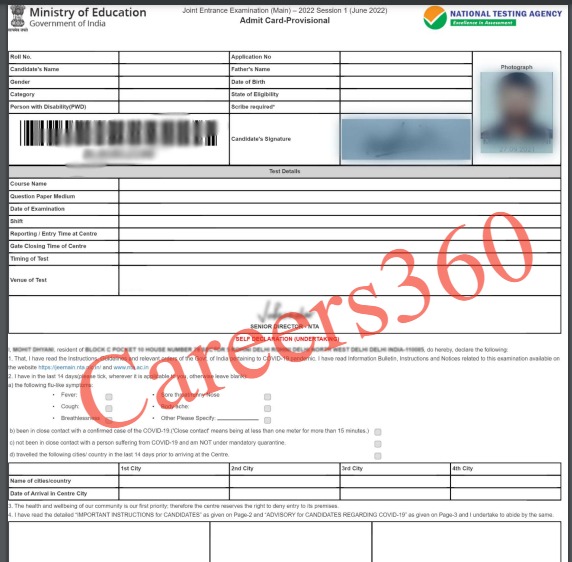
Candidates who are unable to download their admit card must call the JEE Main helpline numbers from 10 am to 5 pm at 0120 6895200 OR send an email to jeemain-nta@nic.in giving their NTA JEE Mains 2026 application number and the confirmation page.
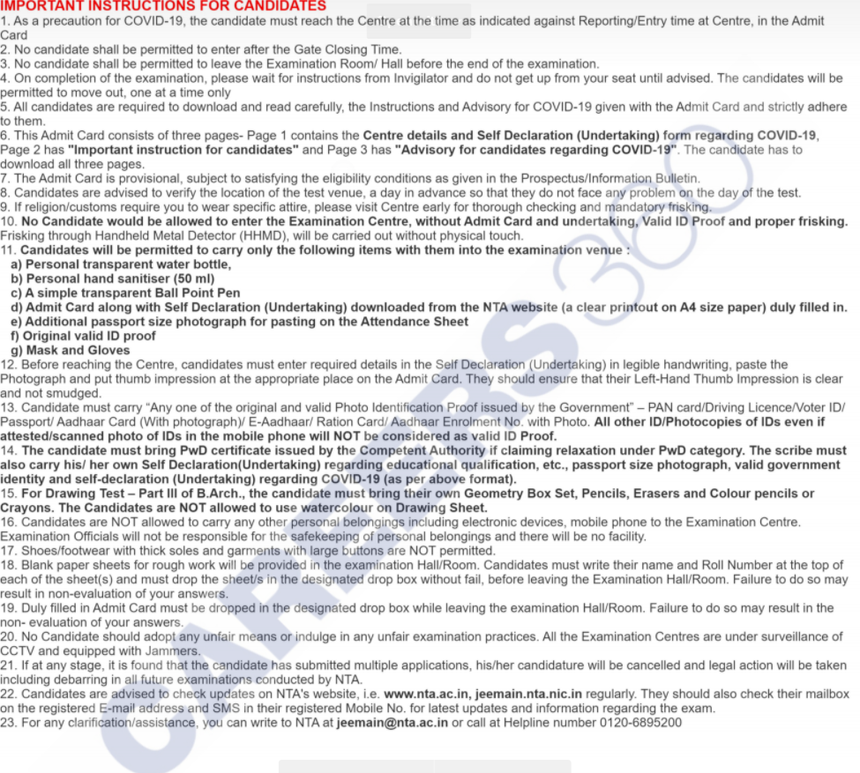
Candidates have to read and adhere to the following JEE Mains 2026 exam day guidelines during the exam:
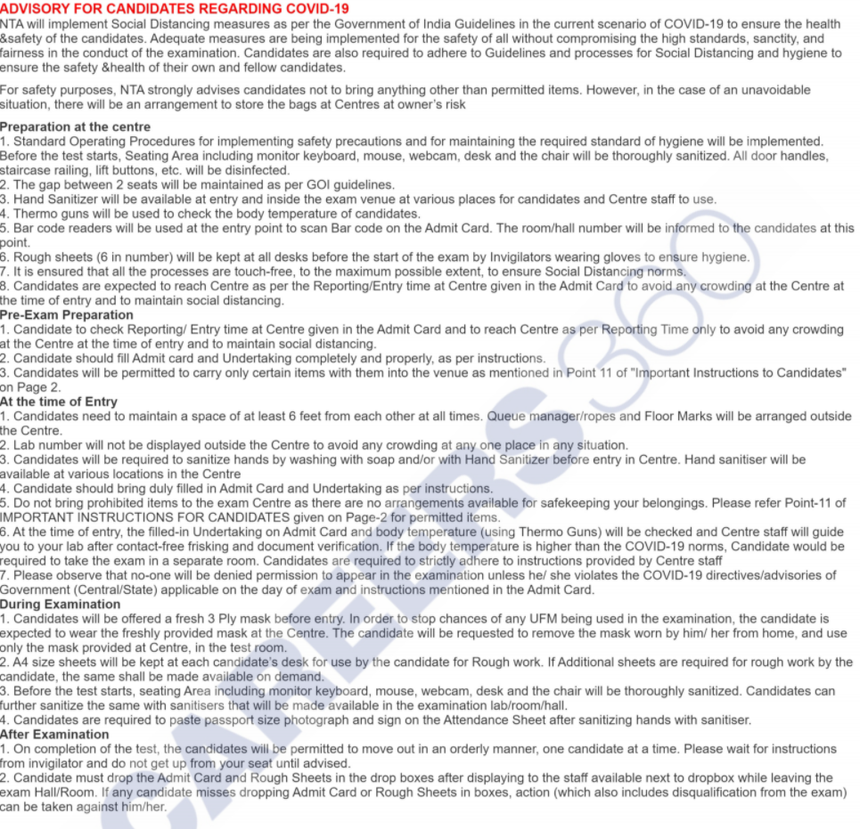
Candidates will be able to check the student reactions on JEE Main 2026 after the conclusion of the exam. Careers360 team will cover all JEE Main 2026 sessions and all the student reactions, reviews, and responses will be updated here. In the meantime, candidates can check the previous year JEE Main student's reactions.
JEE Main 2024 April 5 - Students Reactions
Shift 1 students reactions -
Shift 2 students reactions -
Shift 1 students reactions -
NTA has conducted the JEE Mains 2024 29 January paper shift 1. The authorities concluded the JEE Main 29 January shift 2 at 6 PM. Candidates can check the student's reaction for JEE Main January 29 shift 1 here.
Shift 1 - Students found the Physics and Mathematics sections moderately challenging. The chemistry section was easy. The paper covered topics from both classes 11 and 12, however, students found that the Physics section had more questions from class 12.
Candidates can check here the JEE Main exam January 27 students' reactions for both shifts 1 and 2.
Candidates can check the JEE Main 2026 exam analysis after the exam. The exam analysis of JEE Main 2026 has been updated as per the student’s reaction. Details on the JEE Main difficulty level and most asked topics is available through the JEE Mains 2026 paper analysis.
| JEE Mian 2026 Exam Date | IIT JEE Main Shift 1 Difficulty Level | NTA JEE Main Shift 2 Difficulty level |
|---|---|---|
| JEE Main 2026 analysis for Jan 21 | Physics- Easy - Scoring Chemistry- Difficult Mathematics- Moderate | Physics- Easy-Moderate Chemistry- Difficult Mathematics- Moderate to Difficult |
JEE Main 2026 analysis for Jan 22 | Physics-Easy Chemistry- Moderate Mathematics- Moderate | Physics- Easy to Moderate Chemistry- Moderate Mathematics- Very Difficult & Lengthy |
| JEE Main 2026 analysis for Jan 23 | Physics-Moderate Chemistry- Moderate Mathematics- Moderate | Physics- Toughest Chemistry- Moderate Mathematics-Easy and Lenghty |
| JEE Main 2026 analysis for Jan 24 | Physics-Moderate Chemistry- Moderate Mathematics- Moderate | Physics-Moderate Chemistry- Easy to Moderate Mathematics- Moderate to Difficult |
| JEE Main 2026 analysis for Jan 28 | Physics-Moderate Chemistry-Moderate Mathematics- Moderate | Chemistry - Moderate Physics - Moderate Mathematics - Moderate to Tough |
| JEE Main 2026 analysis for Jan 29 | moderate to tough drawing and aptitude- mostly easy |
Name of Coaching Centre | JEE Main analysis Link |
| Resonance | JEE Main analysis by Resonance |
| Aakash | JEE Main analysis by Aakash |
| Vidyamandir | JEE Main analysis by Vidyamandir |
FIITJEE | |
Sri Chaitanya |
JEE Main 2026 Paper 2 will be held in 2 shifts. Candidates will be able to check the JEE Main 2026 exam analysis for paper 2 once the examination concludes.
The National Testing Agency has activated the link for JEE Main 2026 session 2 result (Paper 1 and 2) on the official website, jeemain.nta.nic.in. Candidates must provide their application number and password to check the JEE Main 2026 result. With the help of the JEE Main scorecard 2026, candidates will be able to check the subject-wise scores, total NTA scores, personal details, All India Rank and more. NTA uses the normalisation process while making JEE Main exam results to equalise the difficulty level of various shifts.
The National Testing Agency has released the rank list for JEE Main 2026 along with the JEE exam result. The authorities follow a tie-breaking rule in case two or more candidates receive the same marks.
For JEE Main 2026 Paper 1 - The tie between candidates obtaining equal total NTA scores in Paper 1, will be resolved as follows:
For JEE Main Paper 2 - The tie between candidates obtaining equal total NTA scores in Paper 2 will be resolved as follows
| Name of Candidate | State Eligibility (State of 12th Class |
|---|---|
SHREYA MISRA | DELHI (NCT) |
SHREYAS MISRA | ANDHRA PRADESH |
SUBHAM KUMAR | BIHAR |
CHIRANJIB KAR | RAJASTHAN |
KABIR SINGH | RAJASTHAN |
BHAVESH PATRA | ODISHA |
ANJ JAIN | HARYANA |
ARNAV GAUTAM | RAJASTHAN |
PASALA MOHITH | ANDHRA PRADESH |
MUDHAY VIRDYA | GUJARAT |
PURVAJ NIRAYYA | MAHARASHTRA |
VIVAN SHARAD MAHWAR | TELANGANA |
| Candidates name | State |
|---|---|
| MD ANAS | RAJASTHAN |
| AYUSH SINGHAL | RAJASTHAN |
| ARCHISMAN NANDY | WEST BENGAL |
| DEVDUTTA MAJHI | WEST BENGAL |
| AAYUSH RAVI CHAUDHARI | MAHARASHTRA |
| LAKSHYA SHARMA | RAJASTHAN |
| KUSHAGRA GUPTA | KARNATAKA |
| HARSSH A GUPTA | TELANGANA |
| AADIT PRAKASH BHAGADE | GUJARAT |
| DAKSH | DELHI |
| HARSH JHA | DELHI |
| RAJIT GUPTA | RAJASTHAN |
| SHREYAS LOHIYA | UTTAR PRADESH |
| SAKSHAM JINDAL | RAJASTHAN |
| SAURAV | UTTAR PRADESH |
| VANGALA AJAY REDDY | TELANGANA |
| SANIDHYA SARAF | MAHARASHTRA |
| VISHAD JAIN | MAHARASHTRA |
| ARNAV SINGH | RAJASTHAN |
| SHIVEN VIKAS TOSHNIWAL | GUJARAT |
| KUSHAGRA BAINGAHA | UTTAR PRADESH |
| SAI MANOGNA GUTHIKONDA | ANDHRA PRADESH |
| OM PRAKASH BEHERA | RAJASTHAN |
| BANI BRATA MAJEE | TELANGANA |
NTA will announce the JEE Main paper 2 result for session 1 online at jeemain.nta.nic.in. Candidates should have their application number and date of birth to download the result of JEE Mains 2026 paper 2.
 Know your chances
NTA has released the JEE Main 2026 cutoff after with the result. The minimum score required to qualify the NTA JEE Main exam is the cutoff of JEE Main 2026. Candidates must know that the qualifying cutoff and admission cutoff for JEE Main 2026 are different. The minimum mark required to fetch a seat in the JEE Main participating institutes is the admission cutoff. JEE Main 2026 cutoff will vary for several categories, branches, and institutes.
| Category | Percentile |
|---|---|
| UR-ALL | 93.4123549 |
| UR-PwBD | 0.0023186 |
| EWS-ALL | 82.4164528 |
| OBC-ALL | 80.9232583 |
| SC-ALL | 63.9172792 |
| ST-ALL | 52.0174712 |
| Category | JEE Main Cutoff 2025 |
|---|---|
| General | 93.1023262 |
| Persons with Disability | 0.0079349 |
| EWS | 80.3830119 |
| OBC-NCL | 79.4313582 |
| SC | 61.1526933 |
| ST | 47.9026465 |
| Category | Cutoff |
|---|---|
| General | 93.2362181 |
| General-PWD | 0.0018700 |
| EWS | 81.3266412 |
| OBC | 79.6757881 |
| SC | 60.0923182 |
| ST | 46.6975840 |
| Category | Cutoff |
|---|---|
General | 90.7788642 |
EWS | 75.6229025 |
OBC | 73.6114227 |
SC | 51.9776027 |
ST | 37.2348772 |
PwD | 0.0013527 |
To understand and know the qualifying JEE Main cutoff, check the table below.
| Category | 2022 | 2021 | 2020 | 2019 |
|---|---|---|---|---|
| OBC-NCL | 67.0090297 | 68.0234447 | 72.8887969 | 74.3166557 |
| SC | 43.0820954 | 46.8825338 | 50.1760245 | 54.0128155 |
General | 88.4121383 | 87.8992241 | 90.3765335 | 89.7548849 |
| ST | 26.7771328 | 34.6728999 | 39.0696101 | 44.3345172 |
| PwD | 0.0031029 | 0.0096375 (UR PH) | 0.0618524 | 0.11371730 |
| GEN-EWS | 63.1114141 | 66.2214845 | 70.2435528 | 78.2174869 |
The cut off marks of JEE Main paper 2 will be released along with the session 2 results. The NTA has declared the JEE Main paper 2 result for session 1 and session 2.
JoSAA will release the JEE Main 2026 counselling notification on the official website, josaa.nic.in. Candidates qualifying the JEE Main exam 2026 will have to complete the JoSAA counselling registration and choice filling process online. The authorities will conduct the seat allotment process based on the number of students who applied for a particular course, the number of seats available, and the rank of the candidates.
Candidates have to follow the below mentioned steps for the JEE Main 2026 counselling and choice-filling process:
NOTE: After the last round is completed, candidates must report to the institutes to complete their admission formalities by paying the balance fee and submitting the requisite documents to the allotted institute.
Candidates can apply for 31 NITs, IIEST Shibpur, 26 IIITs and 33 GFTIs based on JEE Main 2026 ranks. Candidates can check the complete list of the NTA JEE Main participating institutes from the following tables-
| Name of the Institute | Total Number of Seats |
|---|---|
786 | |
710 | |
937 | |
811 | |
867 | |
480 | |
184 | |
937 | |
180 | |
725 | |
150 | |
714 | |
565 | |
832 | |
180 | |
150 | |
135 | |
155 | |
638 | |
235 | |
955 | |
850 | |
200 | |
660 | |
632 | |
740 | |
814 | |
150 | |
800 | |
873 | |
922 |
Candidates can check the JoSAA Participating Institutes from the below table:
| Institute Type |
| National Institutes of Technology Fee Structure |
| Indian Institutes of Information Technology Fee Structure |
| Government-Funded Technical Institutes Fee Structure |
NTA has released the session 2 JEE Main 2026 question paper on the official website. Candidates have to provide the application number and date of birth to download the question paper of JEE Main 2026. In the meantime, candidates who are going to appear for the IIT JEE 2026 exam can attempt the JEE Main PYQ to get an idea of the pattern and difficulty level.
Candidates can follow the steps mentioned below for downloading the JEE Main question paper.
JEE Main January Question Paper 2025 | JEE Mains 2025 April Question Paper |
| JEE Main 2024 question paper (January 24) | JEE Main 2024 question paper (January 24) |
| JEE Main 2024 question paper (January 27) | JEE Main 2024 question paper (January 27) |
| JEE Main 2024 question paper (January 29) | JEE Main 2024 question paper (January 29) |
| JEE Main 2024 question paper (January 30) | JEE Main 2024 question paper (January 30) |
| JEE Main 2024 question paper (January 31) | JEE Main 2024 question paper (January 31) |
| JEE Main 2024 question paper (February 1) Shift 1 and 2 | |
- |
Contact Number:
011-40759000 , 011-69227700
Recognized as Institute of Eminence by Govt. of India | NAAC ‘A++’ Grade | Upto 75% Scholarships | Only JEE Scores Accepted
Ranked #29 in Engineering Category in India by NIRF Ranking 2025 | Highest CTC 1.23 Cr | Average 11.38 LPA | Scholarships Available
Frequently Asked Questions (FAQs)
Yes, the JEE Main 2026 session 2 result has been declared on April 20, 2026, for paper 1.
The JEE Main 2026 session 1 exam was held on April 2, 4, 5, 6, 7 and 8, 2026. The authority has rescheduled the JEE Main session 2 exam on April 5 for those who had requested a change due to Easter celebrations or due to a clash with other exams. While session 1 was held on January 21, 22, 23, 24, 28 and 29, 2026,
Candidates can download the JEE Mains 2026 session 2 admit card using the application number and password.
The detailed JEE Mains 2026 syllabus was issued on October 31, 2025.
JEE Main 2026 was conducted in 13 languages including English, Hindi, Assamese, Bengali, Gujarati, Kannada, Marathi, Malayalam, Odia, Punjabi, Tamil, Telugu, and Urdu.
National Testing Agency is conducting JEE Main exam 2026.
Yes, a candidate can get into IEM Kolkata through JEE Mains; based on previous year cutoffs, your likely rank will be around 40,000 or below. JEE Mains is also an option for admission to Heritage College.
NTA has released JEE Main exam syllabus online at, jeemain.nta.nic.in.
JoSAA conducts centralized counselling for JEE Main qualified candidates. To participate, the candidates have to register and choose their preferred courses and colleges from the available list. Allotment will be done as per their merit in JEE Main, preferences, and availability of seats. A total of seven rounds of counselling will be held.
The primary purpose of JEE Main is for admission into undergraduate progammes (B.E./B.Tech), architecture (B.Arch), and planning (B.Planning), and programs at various prestigious institutions, including National Institutes of Technology (NITs), Indian Institutes of Information Technology (IIITs), and Centrally Funded Technical Institutions (CFTIs)
Application Date
09 Mar, 2026 - 26 May, 2026
Admit Card Date
24 May, 2026 - 07 Jun, 2026
Answer Key Date
25 May, 2026 - 26 May, 2026
On Question asked by student community
Hi,
With around 76 percentile in JEE Main and 75.8% in boards, you still have decent options for CSE/IT, mainly in private colleges and state counselling. Top NITs/IIITs for CSE will be very difficult, but colleges like Jaypee Institute of Information Technology, Thapar Institute of Engineering and Technology, GL Bajaj
Hi,
You can use the following link to predict your JEE Advanced rank: JEE Advanced rank predictor
All the best!
Hi,
With 149 marks in JEE Advanced and OBC-NCL category, your expected category rank can be around 1.5k–2.5k, which is honestly a pretty strong position.
You can realistically get good core branches in older IITs like Indian Institute of Technology Kharagpur, Indian Institute of Technology Roorkee, or Indian Institute of

Among top 100 Universities Globally in the Times Higher Education (THE) Interdisciplinary Science Rankings 2026
Last Date to Apply: 30th May | Ranked #43 among Engineering colleges in India by NIRF | Highest Package 1.3 CR , 100% Placements
Top Placements: 50 LPA in Google | 46.38 LPA in Amazon | 45 LPA in Adobe | 50 LPA in Microsoft | 44.14 in Amazon
Gateway to B.Tech, B.Tech + MBA Tech.,B.Pharma + MBA (Pharma Tech.) @ NMIMS (Deemed to be University)
Highest CTC 94.25 LPA | Average CTC 11.09 LPA Approved by UGC & AICTC | Accredited by NBA & NAAC A Grade | 98% Students Placed | 260+ Recruiters
Recognized as Institute of Eminence by Govt. of India | NAAC ‘A++’ Grade | Upto 75% Scholarships | Only JEE Scores Accepted
College Available: 1571
College Available: 1259
College Available: 1150
College Available: 902
College Available: 775
